mirror of
https://github.com/sanjeed5/awesome-cursor-rules-mdc.git
synced 2026-11-27 21:22:55 +08:00
 sanjeed5
331fb6ffac
The CLI tool has been deprecated, so removing the entire cursor-rules-cli directory and all references to it:
- Delete cursor-rules-cli directory and all its contents
- Remove Product Hunt badge from README
- Update project structure documentation in README
- Remove code that copied rules.json to cursor-rules-cli
- Remove unused shutil import from generate_mdc_files.py
139 lines
4.1 KiB
Markdown
139 lines
4.1 KiB
Markdown
# MDC Rules Generator
|
|
|
|
> **Disclaimer:** This project is not officially associated with or endorsed by Cursor. It is a community-driven initiative to enhance the Cursor experience.
|
|
|
|
This project generates Cursor MDC (Markdown Cursor) rule files from a structured JSON file containing library information. It uses Exa for semantic search and LLM (Gemini) for content generation.
|
|
|
|
[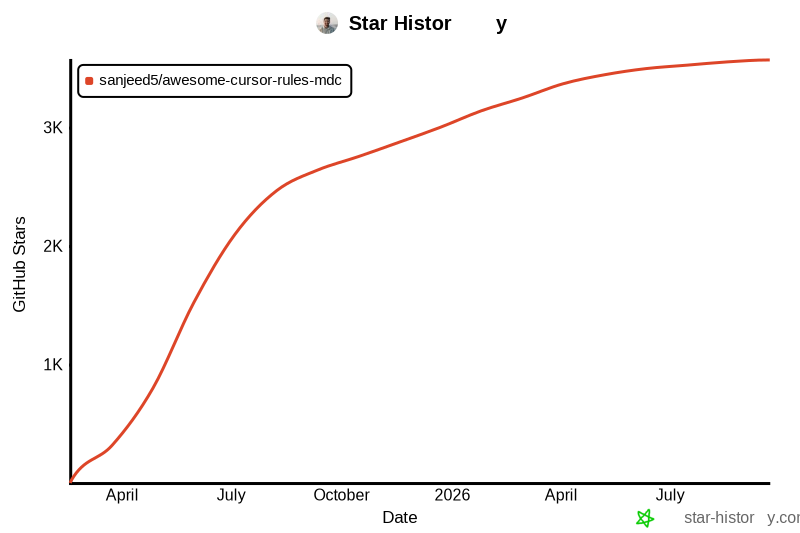](https://www.star-history.com/#sanjeed5/awesome-cursor-rules-mdc&Date)
|
|
|
|
## Features
|
|
|
|
- Generates comprehensive MDC rule files for libraries
|
|
- Uses Exa for semantic web search to gather best practices
|
|
- Leverages LLM to create detailed, structured content
|
|
- Supports parallel processing for efficiency
|
|
- Tracks progress to allow resuming interrupted runs
|
|
- Smart retry system that focuses on failed libraries by default
|
|
|
|
## Prerequisites
|
|
|
|
- Python 3.8+
|
|
- [uv](https://github.com/astral-sh/uv) for dependency management
|
|
- API keys for:
|
|
- Exa (for semantic search)
|
|
- LLM provider (Gemini, OpenAI, or Anthropic)
|
|
|
|
## Installation
|
|
|
|
1. Clone this repository:
|
|
```bash
|
|
git clone https://github.com/sanjeed5/awesome-cursor-rules-mdc.git
|
|
cd awesome-cursor-rules-mdc
|
|
```
|
|
|
|
2. Install dependencies using uv:
|
|
```bash
|
|
uv sync
|
|
```
|
|
|
|
3. Set up environment variables:
|
|
Create a `.env` file in the project root with your API keys (see `.env.example`):
|
|
```
|
|
EXA_API_KEY=your_exa_api_key
|
|
GEMINI_API_KEY=your_google_gemini_api_key # For Gemini
|
|
# Or use one of these depending on your LLM choice:
|
|
# OPENAI_API_KEY=your_openai_api_key
|
|
# ANTHROPIC_API_KEY=your_anthropic_api_key
|
|
```
|
|
|
|
## Usage
|
|
|
|
Run the generator script with:
|
|
|
|
```bash
|
|
uv run src/generate_mdc_files.py
|
|
```
|
|
|
|
By default, the script will only process libraries that failed in previous runs.
|
|
|
|
### Command-line Options
|
|
|
|
- `--test`: Run in test mode (process only one library)
|
|
- `--tag TAG`: Process only libraries with a specific tag
|
|
- `--library LIBRARY`: Process only a specific library
|
|
- `--output OUTPUT_DIR`: Specify output directory for MDC files
|
|
- `--verbose`: Enable verbose logging
|
|
- `--workers N`: Set number of parallel workers
|
|
- `--rate-limit N`: Set API rate limit calls per minute
|
|
- `--regenerate-all`: Process all libraries, including previously completed ones
|
|
|
|
### Examples
|
|
|
|
```bash
|
|
# Process failed libraries (default behavior)
|
|
uv run src/generate_mdc_files.py
|
|
|
|
# Regenerate all libraries
|
|
uv run src/generate_mdc_files.py --regenerate-all
|
|
|
|
# Process only Python libraries
|
|
uv run src/generate_mdc_files.py --tag python
|
|
|
|
# Process a specific library
|
|
uv run src/generate_mdc_files.py --library react
|
|
```
|
|
|
|
## Adding New Rules
|
|
|
|
Adding support for new libraries is simple:
|
|
|
|
1. **Edit the rules.json file**:
|
|
- Add a new entry to the `libraries` array:
|
|
```json
|
|
{
|
|
"name": "your-library-name",
|
|
"tags": ["relevant-tag1", "relevant-tag2"]
|
|
}
|
|
```
|
|
|
|
2. **Generate the MDC files**:
|
|
- Run the generator script:
|
|
```bash
|
|
uv run src/generate_mdc_files.py
|
|
```
|
|
- The script automatically detects and processes new libraries
|
|
|
|
3. **Contribute back**:
|
|
- Test your new rules with real projects
|
|
- Consider raising a PR to contribute your additions back to the community
|
|
|
|
## Configuration
|
|
|
|
The script uses a `config.yaml` file for configuration. You can modify this file to adjust:
|
|
|
|
- API rate limits
|
|
- Output directories
|
|
- LLM model selection
|
|
- Processing parameters
|
|
|
|
## Project Structure
|
|
|
|
```
|
|
.
|
|
├── src/ # Main source code directory
|
|
│ ├── generate_mdc_files.py # Main generator script
|
|
│ ├── config.yaml # Configuration file
|
|
│ ├── mdc-instructions.txt # Instructions for MDC generation
|
|
│ ├── logs/ # Log files directory
|
|
│ └── exa_results/ # Directory for Exa search results
|
|
├── rules-mdc/ # Output directory for generated MDC files
|
|
├── rules.json # Input file with library information
|
|
├── pyproject.toml # Project dependencies and metadata
|
|
├── .env.example # Example environment variables
|
|
└── LICENSE # MIT License
|
|
```
|
|
|
|
## License
|
|
|
|
[MIT License](LICENSE)
|